Code
library(jsonlite)
library(tidyverse)

# Load the YouGov tweet sentiment data from GitHub
yg <- fromJSON("https://github.com/kennyjoseph/trump_tweets_icwsm/raw/master/data/all_yougov_tweetdata_updated.json")In this exercise, we will load a dataset of YouGov sentiment ratings of Trump tweets and explore how different people rate those tweets. (You can find the associated slides here.)
What you will be able to practice here:
First, we load the necessary libraries. jsonlite lets us read JSON data directly from a URL, and tidyverse provides a suite of data manipulation and visualization tools.
library(jsonlite)
library(tidyverse)
# Load the YouGov tweet sentiment data from GitHub
yg <- fromJSON("https://github.com/kennyjoseph/trump_tweets_icwsm/raw/master/data/all_yougov_tweetdata_updated.json")Check what we have imported:
names(yg)[1] "text" "group" "data" "created_at"
[5] "survey_date" "objectID" "_highlightResult"# View first 5 tweet texts
yg$text[1:5][1] "Great honor to be headed to the Army-Navy game today. Will be there shortly, landing now! https://t.co/ByAfESq8aS"
[2] "....left and right, he then woke up from his dream screaming that HE LIED. Next time I go to Vietnam I will ask 'the Dick' to travel with me!"
[3] "Watched Da Nang Dick Blumenthal on television spewing facts almost as accurate as his bravery in Vietnam (which he never saw). As the bullets whizzed by Da Nang Dicks head, as he was saving soldiers...."
[4] "Very sad day & night in Paris. Maybe it's time to end the ridiculous and extremely expensive Paris Agreement and return money back to the people in the form of lower taxes? The U.S. was way ahead of the curve on that and the only major country where emissions went down last year!"
[5] "'This is collusion illusion, there is no smoking gun here. At this late date, after all that we have gone through, after millions have been spent, we have no Russian Collusion. There is nothing impeachable here.' @GeraldoRivera Time for the Witch Hunt to END!" # Peek at the nested data frame
yg$data %>% tibble() %>% head()# A tibble: 6 x 4
All$score $base $data Democrat$score Republican$score Independent$score
<dbl> <int> <list> <dbl> <dbl> <dbl>
1 20.6 1000 <dbl [5]> -38.2 104. 37.3
2 -58.3 1000 <dbl [5]> -140. 45.1 -48.0
3 -58.3 1000 <dbl [5]> -140. 45.1 -48.0
4 -26.7 1000 <dbl [5]> -123. 92.1 -3.53
5 -34.8 1000 <dbl [5]> -133. 99.1 -22.8
6 13.5 1000 <dbl [5]> -54.3 110. 29.5
# i 6 more variables: Democrat$base <int>, $data <list>, Republican$base <int>,
# $data <list>, Independent$base <int>, $data <list>We now construct a tidy tibble that includes:
text: the tweet contentscore: overall sentiment scorescore_dems: average rating by Democratsscore_reps: average rating by Republicansdata <- tibble(
text = yg$text,
score = yg$data$All$score,
score_dems = yg$data$Democrat$score,
score_reps = yg$data$Republican$score
)
# Display the first few rows
data# A tibble: 4,404 x 4
text score score_dems score_reps
<chr> <dbl> <dbl> <dbl>
1 Great honor to be headed to the Army-Navy game t~ 20.6 -38.2 104.
2 ....left and right, he then woke up from his dre~ -58.3 -140. 45.1
3 Watched Da Nang Dick Blumenthal on television sp~ -58.3 -140. 45.1
4 Very sad day & night in Paris. Maybe it's time t~ -26.7 -123. 92.1
5 'This is collusion illusion, there is no smoking~ -34.8 -133. 99.1
6 ....I am thankful to both of these incredible me~ 13.5 -54.3 110.
7 I am pleased to announce my nomination of four-s~ 13.5 -54.3 110.
8 AFTER TWO YEARS AND MILLIONS OF PAGES OF DOCUMEN~ -39.6 -136. 78.2
9 The idea of a European Military didn't work out ~ -18.2 -109. 87.2
10 The Paris Agreement isn't working out so well fo~ -42.2 -131. 69.6
# i 4,394 more rowsCheck for missing values:
any(is.na(data$score_dems)) # Were there any missing Democrat ratings?[1] FALSEany(is.na(data$score_reps)) # Were there any missing Republican ratings?[1] FALSECalculate the average rating among Democrats and Republicans:
mean_dems <- data$score_dems %>% mean(na.rm = TRUE)
mean_reps <- data$score_reps %>% mean(na.rm = TRUE)

mean_dems  # Average rating by Democrats
[1] -93.17322mean_reps # Average rating by Republicans[1] 100.5169# Arrange tweets by descending and ascending overall score
# Note this will not influence the original data, or subsequent plots
data %>% arrange(score) %>% head()# A tibble: 6 x 4
text score score_dems score_reps
<chr> <dbl> <dbl> <dbl>
1 I know Mark Cuban well. He backed me big-time but~ -81.4 -134. -18.0
2 I heard poorly rated @Morning_Joe speaks badly of~ -77.5 -143. 6.39
3 ...to Mar-a-Lago 3 nights in a row around New Yea~ -77.5 -143. 6.39
4 Crazy Joe Scarborough and dumb as a rock Mika are~ -76.7 -150. 27.7
5 Lebron James was just interviewed by the dumbest ~ -72.3 -168. 45.8
6 Just watched Wacky Tom Steyer, who I have not see~ -71.7 -148. 45.9 data %>%
summarize(lowest = min(score),highest=max(score))# A tibble: 1 x 2
lowest highest
<dbl> <dbl>
1 -81.4 82.9# Histogram of overall sentiment scores
data %>%
ggplot(aes(x = score)) +
geom_histogram(bins = 35, fill = "yellow3", color = "black") +
theme_bw() +
labs(title = "Distribution of Overall Sentiment Scores", x = "Sentiment Score", y = "Count")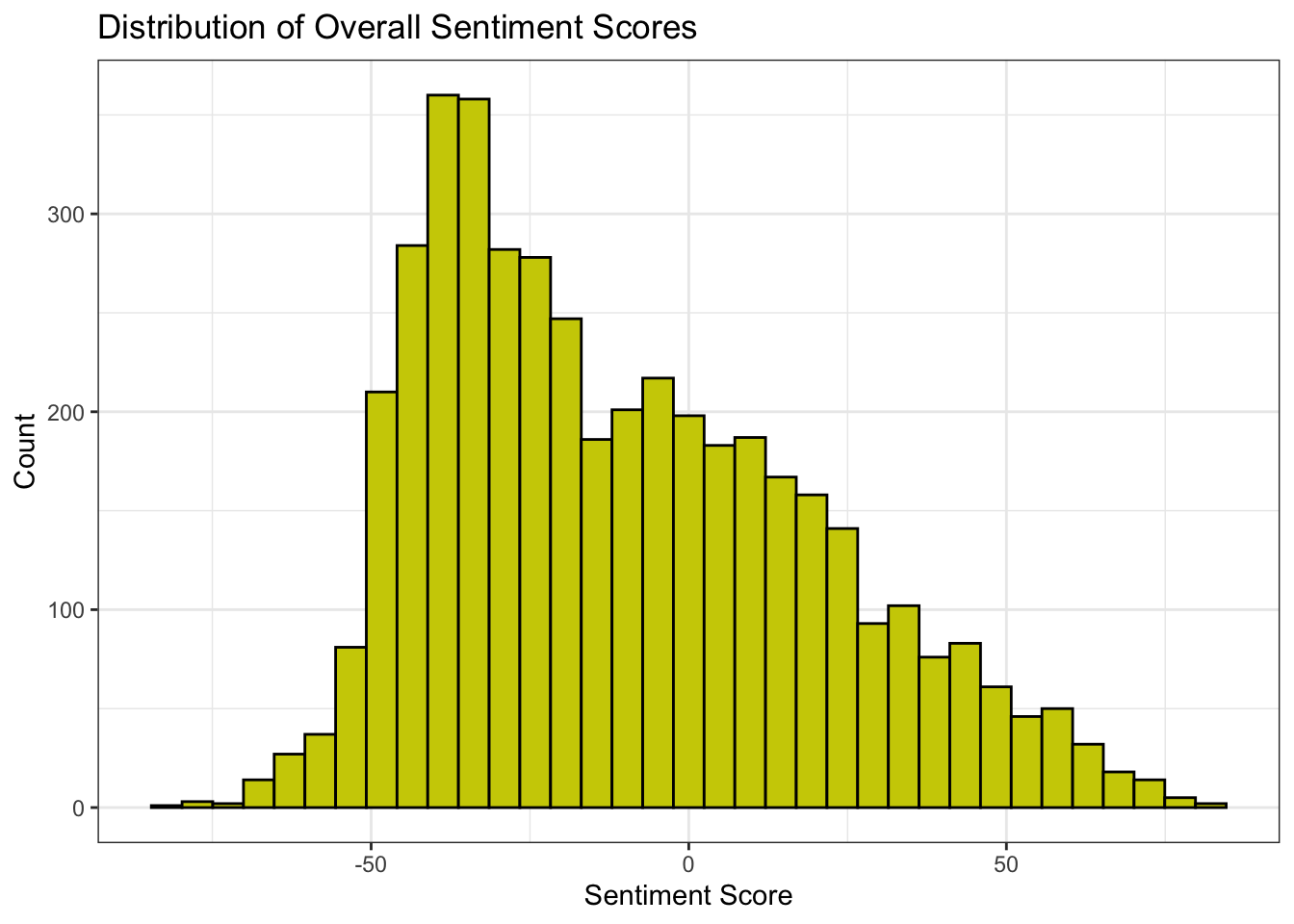
Or consider running:
# Density plot of overall scores
data %>%
  ggplot(aes(x = score)) +
  geom_density() +
  theme_bw() +
  labs(title = "Density of Overall Sentiment Scores", x = "Sentiment Score", y = "Density")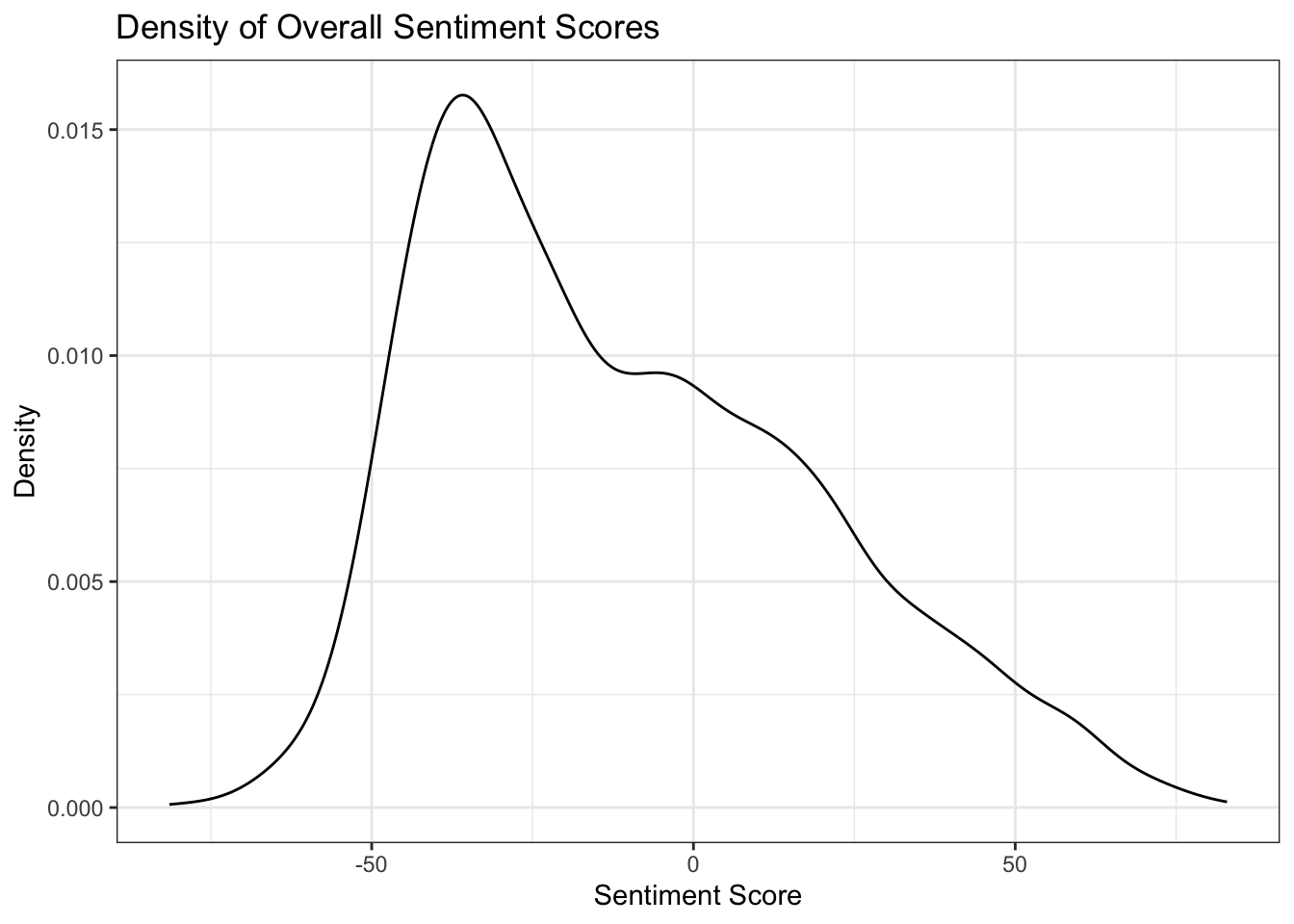
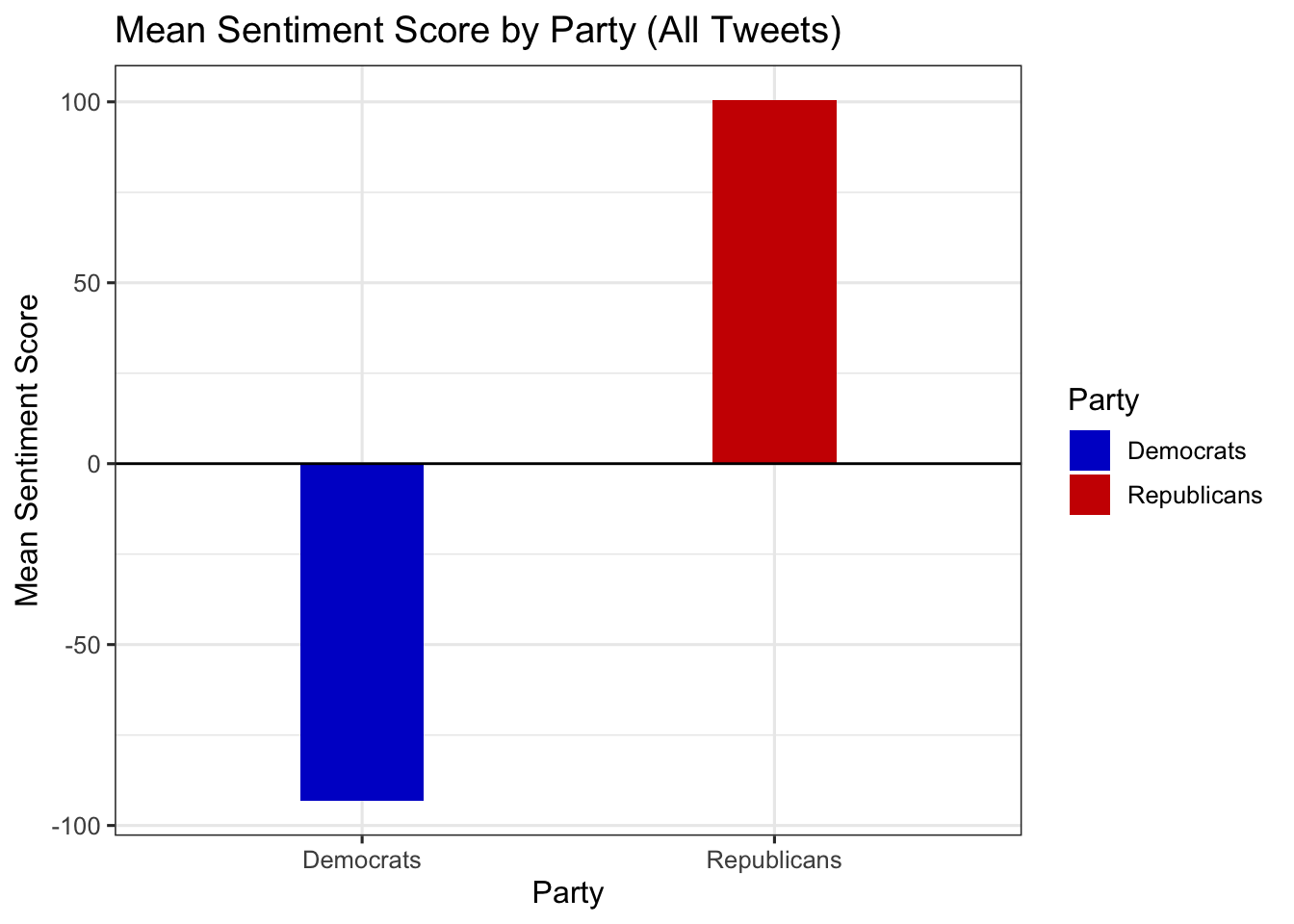
Compute and compare mean ratings by party
What should the structure of the input be?
data %>%
  summarize(
    Democrats = mean(score_dems, na.rm = TRUE),
    Republicans = mean(score_reps, na.rm = TRUE)
  )
# A tibble: 1 x 2
Democrats Republicans
<dbl> <dbl>
1 -93.2 101.Compute and compare mean ratings by party
What should the structure of the input be?
Better to stack the data (go from wide to long)
data %>%
  summarize(
    Democrats = mean(score_dems, na.rm = TRUE),
    Republicans = mean(score_reps, na.rm = TRUE)
  ) %>% pivot_longer(cols = everything(),
                 names_to = "party",
                 values_to = "mean_score")
# A tibble: 2 x 2
party mean_score
<chr> <dbl>
1 Democrats -93.2
2 Republicans 101. data %>%
summarize(
Democrats = mean(score_dems, na.rm = TRUE),
Republicans = mean(score_reps, na.rm = TRUE)
) %>%
pivot_longer(cols = everything(), names_to = "party", values_to = "mean_score") %>%
ggplot(aes(x = party, y = mean_score)) +
geom_col(aes(fill = party), width = 0.3) +
geom_hline(yintercept = 0, color = "black") +
scale_fill_manual(values = c("Democrats" = "blue3", "Republicans" = "red3")) +
theme_bw(base_size = 12) +
labs(
x = "Party",
y = "Mean Sentiment Score",
title = "Mean Sentiment Score by Party (All Tweets)",
fill = "Party"
)
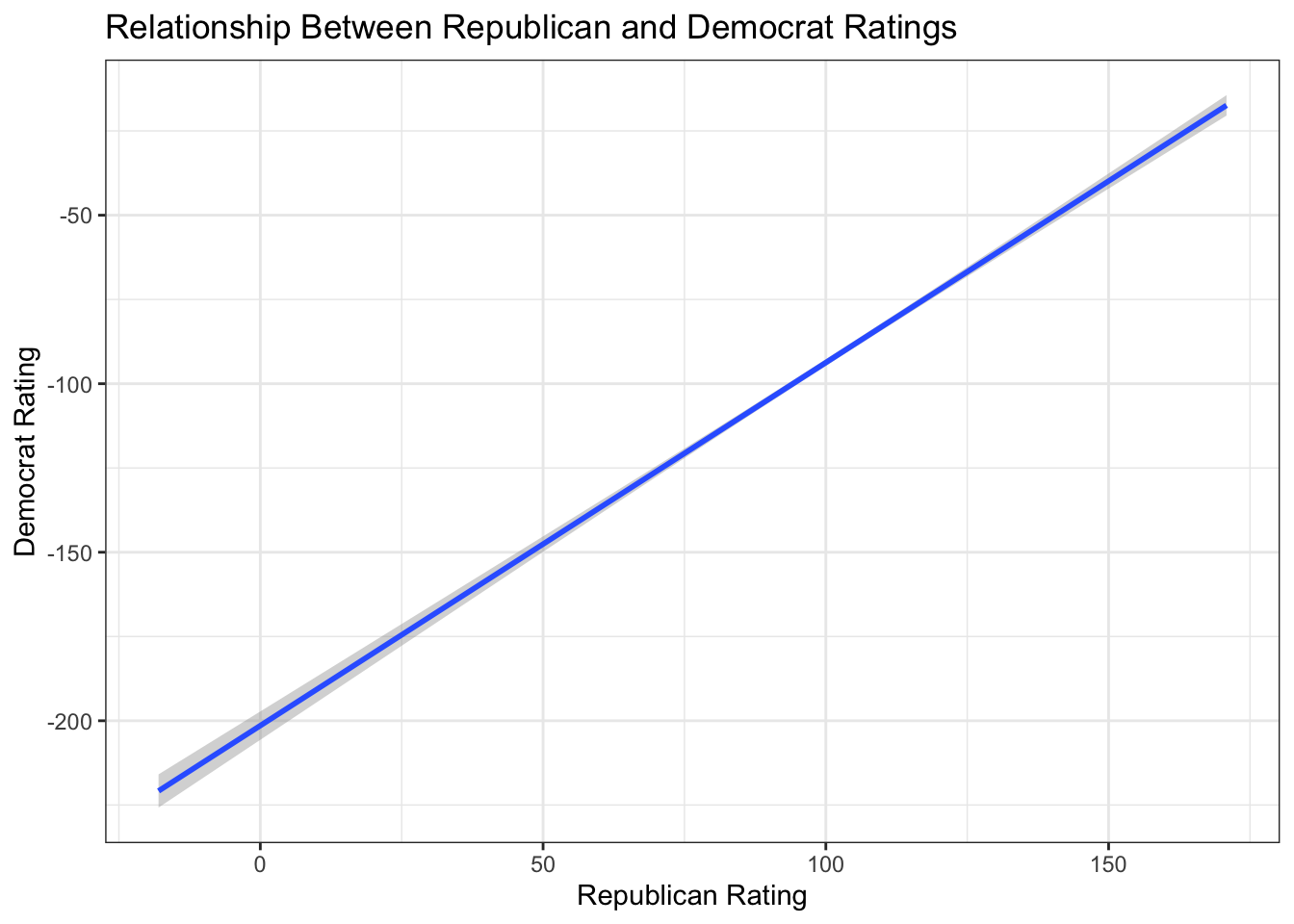
Plot Democrat ratings (score_dems) against Republican ratings (score_reps) to see whether respondents tend to agree (in spite of an anticipated “intercept shift”)
fig_layer <- data %>%
  ggplot(aes(x = score_reps, y = score_dems))

fig_layer +
 geom_point()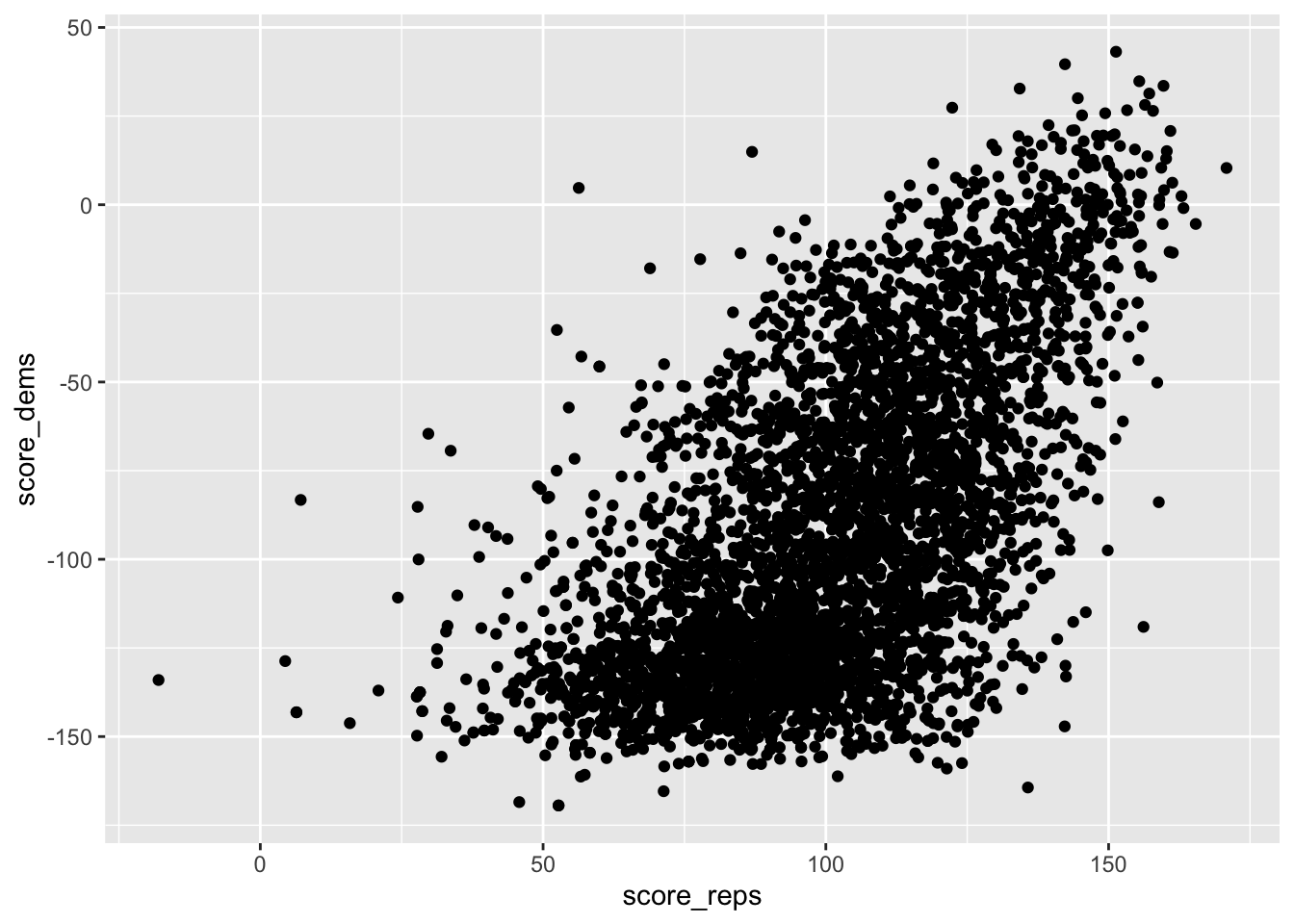
Another way to show the correlation
fig_layer +
  geom_smooth(method = "lm") +
  theme_bw() +
  labs(
    title = "Relationship Between Republican and Democrat Ratings",
    x = "Republican Rating",
    y = "Democrat Rating"
  )
Reshape the full data for plotting density curves of each rating type:
( long_data <- data %>%
  pivot_longer(
    cols = c(score, score_dems, score_reps),
    names_to = "party",
    values_to = "score"
  ) )
# A tibble: 13,212 x 3
text party score
<chr> <chr> <dbl>
1 Great honor to be headed to the Army-Navy game today. Will be t~ score 20.6
2 Great honor to be headed to the Army-Navy game today. Will be t~ scor~ -38.2
3 Great honor to be headed to the Army-Navy game today. Will be t~ scor~ 104.
4 ....left and right, he then woke up from his dream screaming th~ score -58.3
5 ....left and right, he then woke up from his dream screaming th~ scor~ -140.
6 ....left and right, he then woke up from his dream screaming th~ scor~ 45.1
7 Watched Da Nang Dick Blumenthal on television spewing facts alm~ score -58.3
8 Watched Da Nang Dick Blumenthal on television spewing facts alm~ scor~ -140.
9 Watched Da Nang Dick Blumenthal on television spewing facts alm~ scor~ 45.1
10 Very sad day & night in Paris. Maybe it's time to end the ridic~ score -26.7
# i 13,202 more rowslong_data %>%
ggplot(aes(y = party, x = score)) +
geom_point(alpha = .1) + labs(x="Tweet ratings",y="")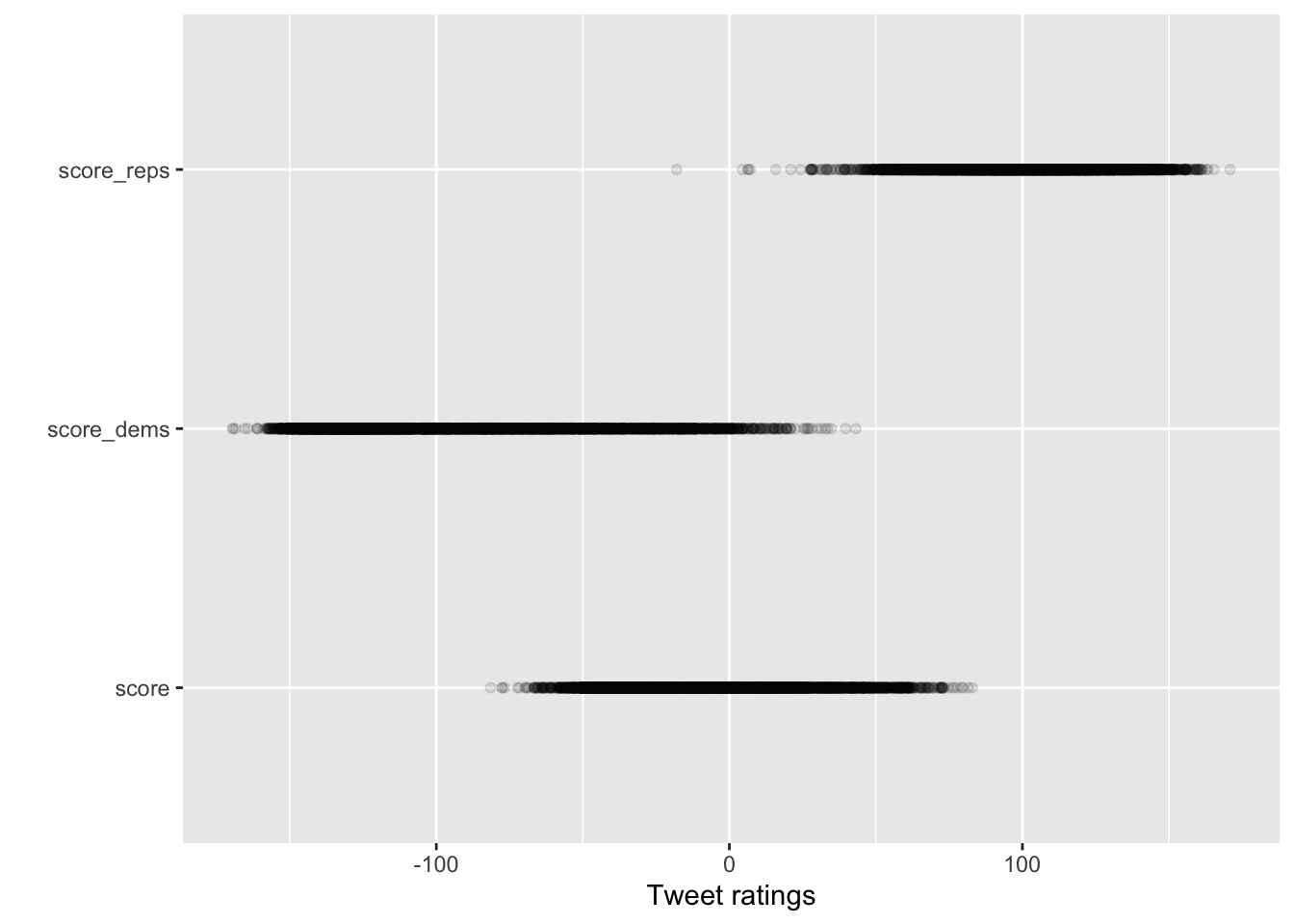
long_data %>%
  ggplot(aes(y = party, x = score)) +
  geom_jitter(alpha = .1) + labs(x="Tweet ratings",y="")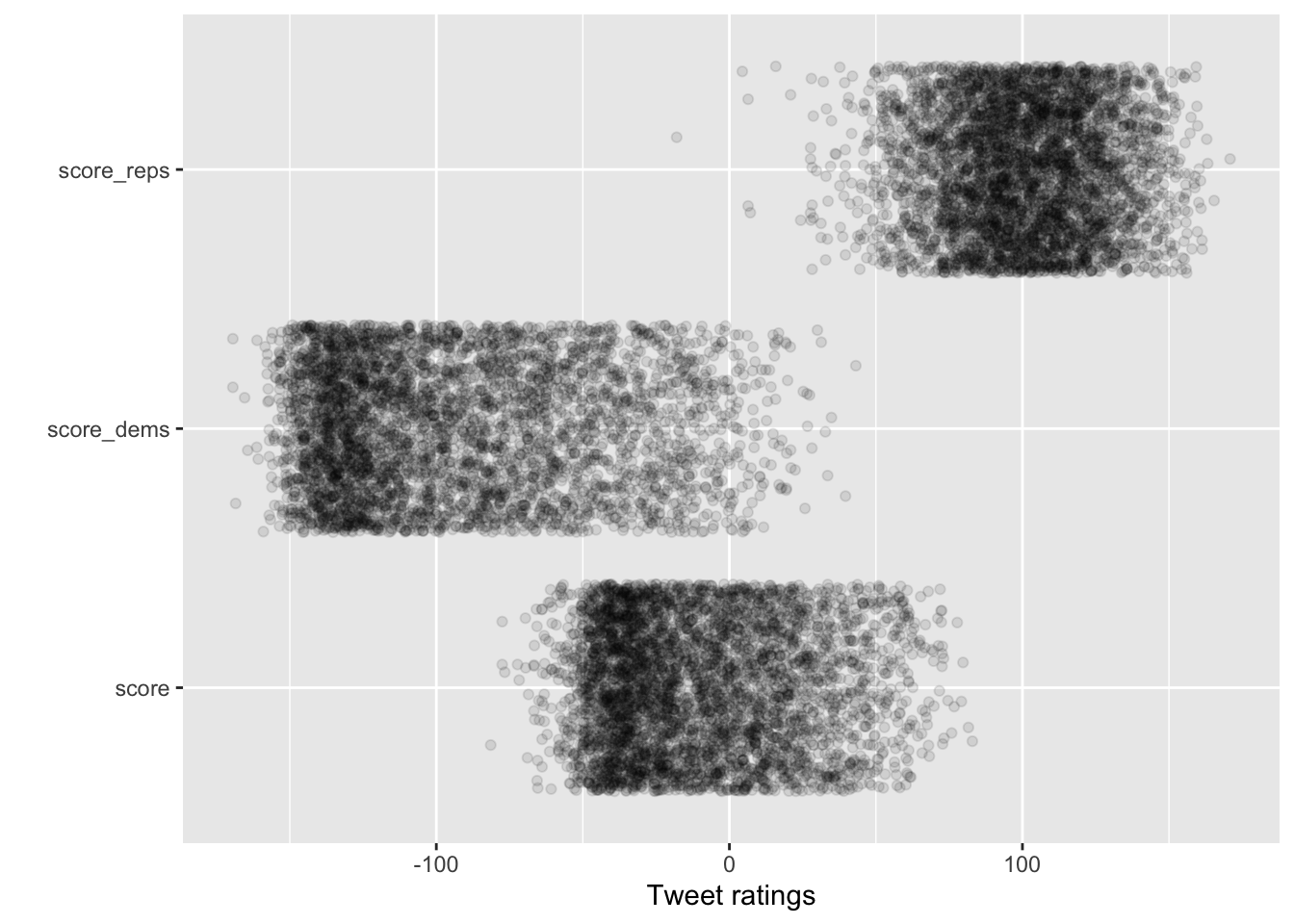
long_data %>%
  ggplot(aes(y = party, x = score)) +
  geom_jitter(alpha = .05,height = .2) + labs(x="Tweet ratings",y="")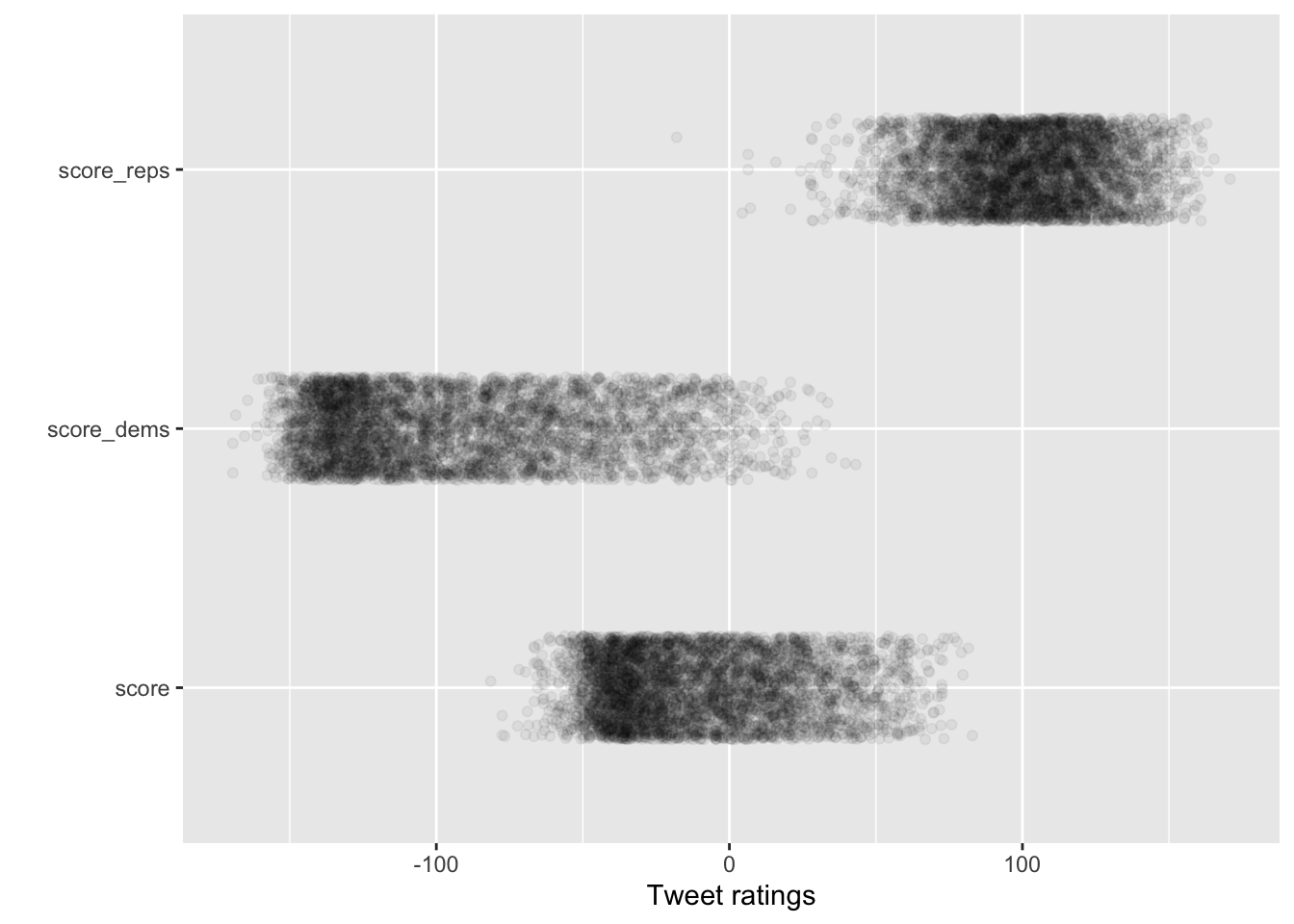
long_data %>%
 mutate(Party = case_when(
    party == "score_dems" ~ "Democrats",
    party == "score_reps" ~ "Republicans",
    TRUE ~ "Overall") ) %>%
  ggplot(aes(y = Party, x = score)) +
  geom_jitter(alpha = .05,height = .2) + labs(x="Tweet ratings",y="")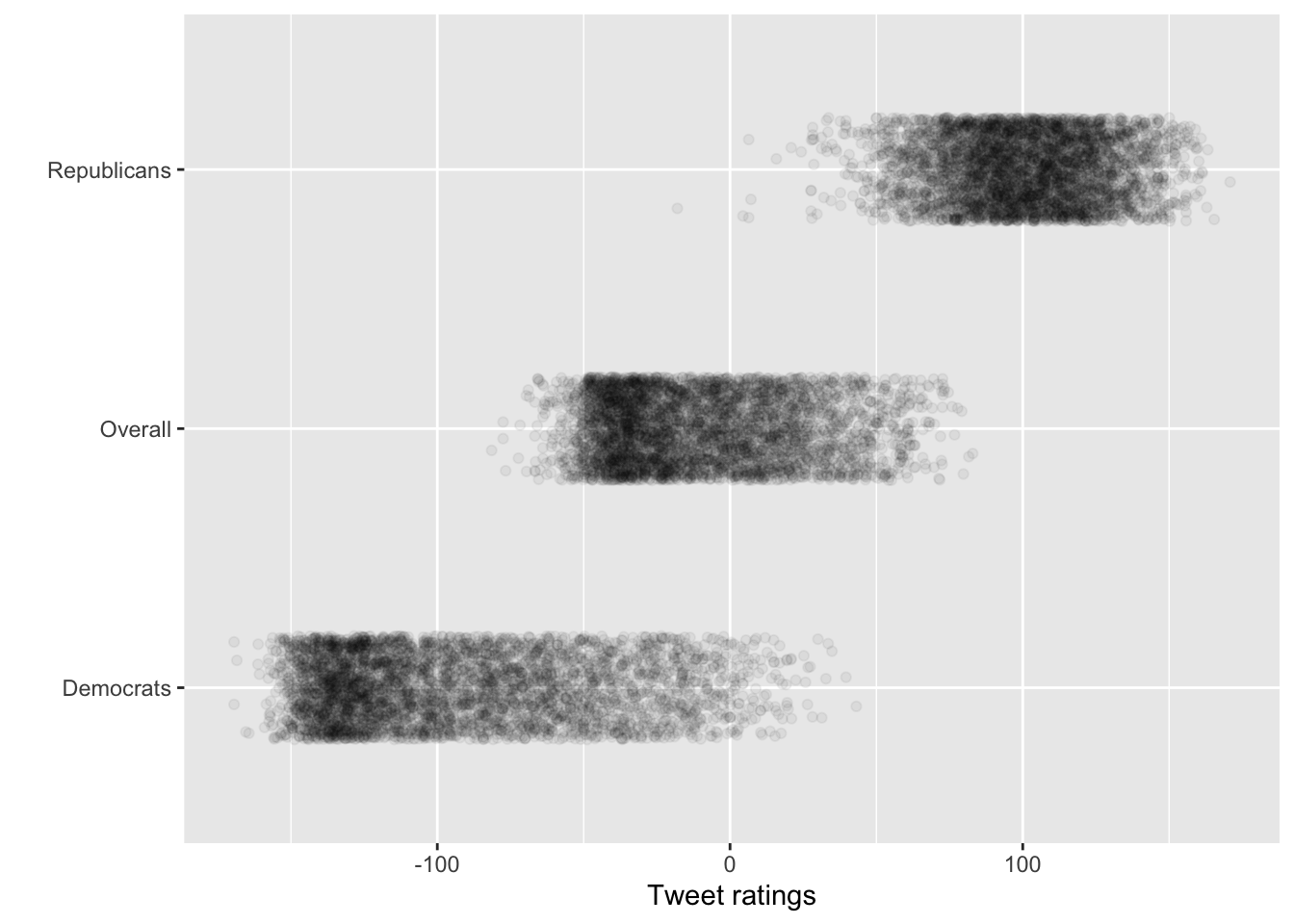
long_data %>%
 mutate(Party = case_when(
    party == "score_dems" ~ "Among Democrats",
    party == "score_reps" ~ "Among Republicans",
    TRUE ~ "Overall") ) %>%
  ggplot(aes(y = Party, x = score, color = Party)) +
  geom_jitter(alpha = .065,height = .2, show.legend = F) + labs(x="Tweet ratings",y="") +
scale_color_manual(values = c("Among Democrats" = "steelblue", "Among Republicans" = "red4", "score"= "Overall")) + theme_minimal() 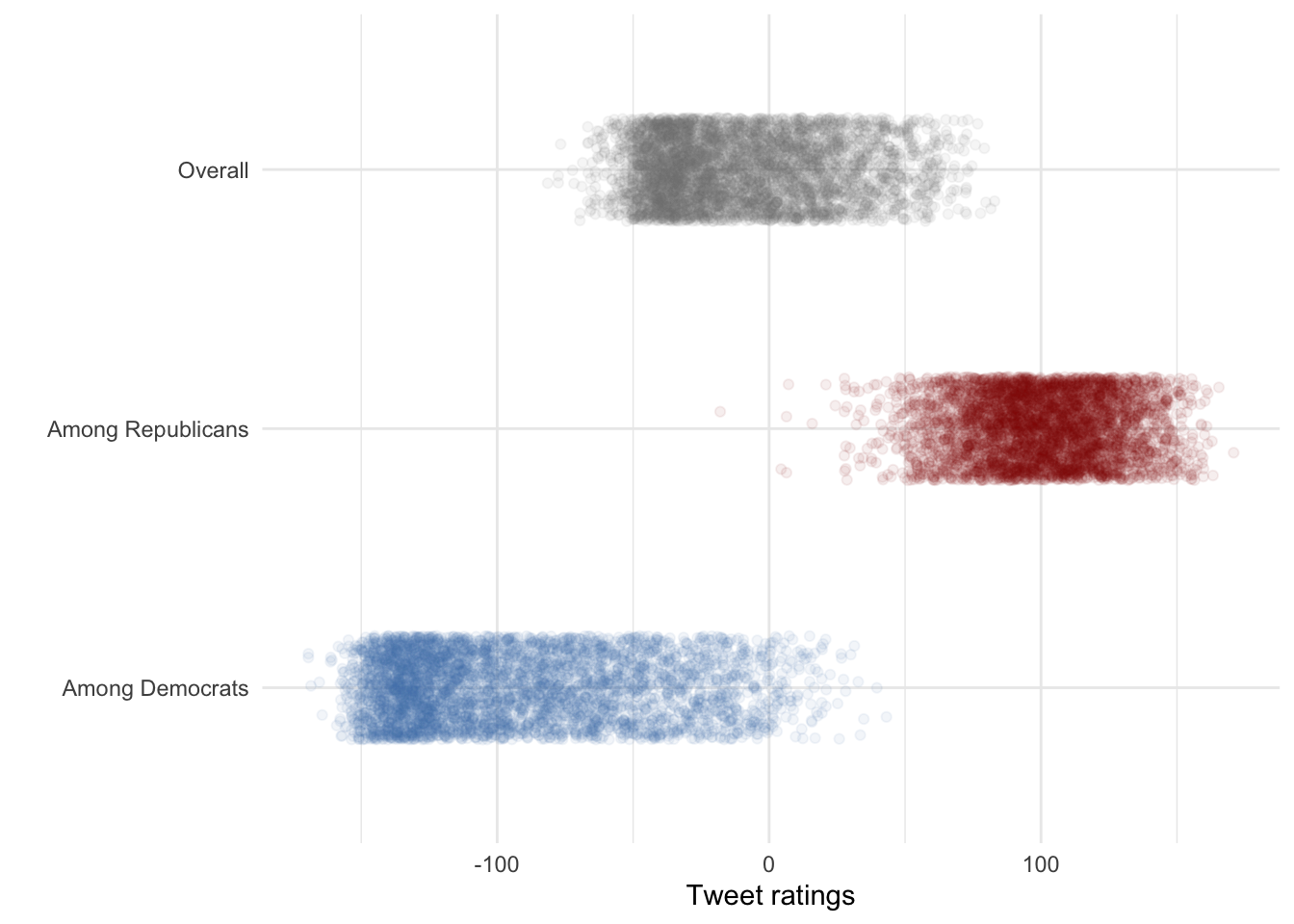
long_data %>%
 mutate(Party = case_when(
    party == "score_dems" ~ "Among Democrats",
    party == "score_reps" ~ "Among Republicans",
    TRUE ~ "Overall") ) %>%
  ggplot(aes(y = Party, x = score, fill = Party)) +
  geom_boxplot() +
scale_fill_manual(values = c("Among Democrats" = "steelblue", "Among Republicans" = "red4", "score"= "Overall")) + theme_minimal() 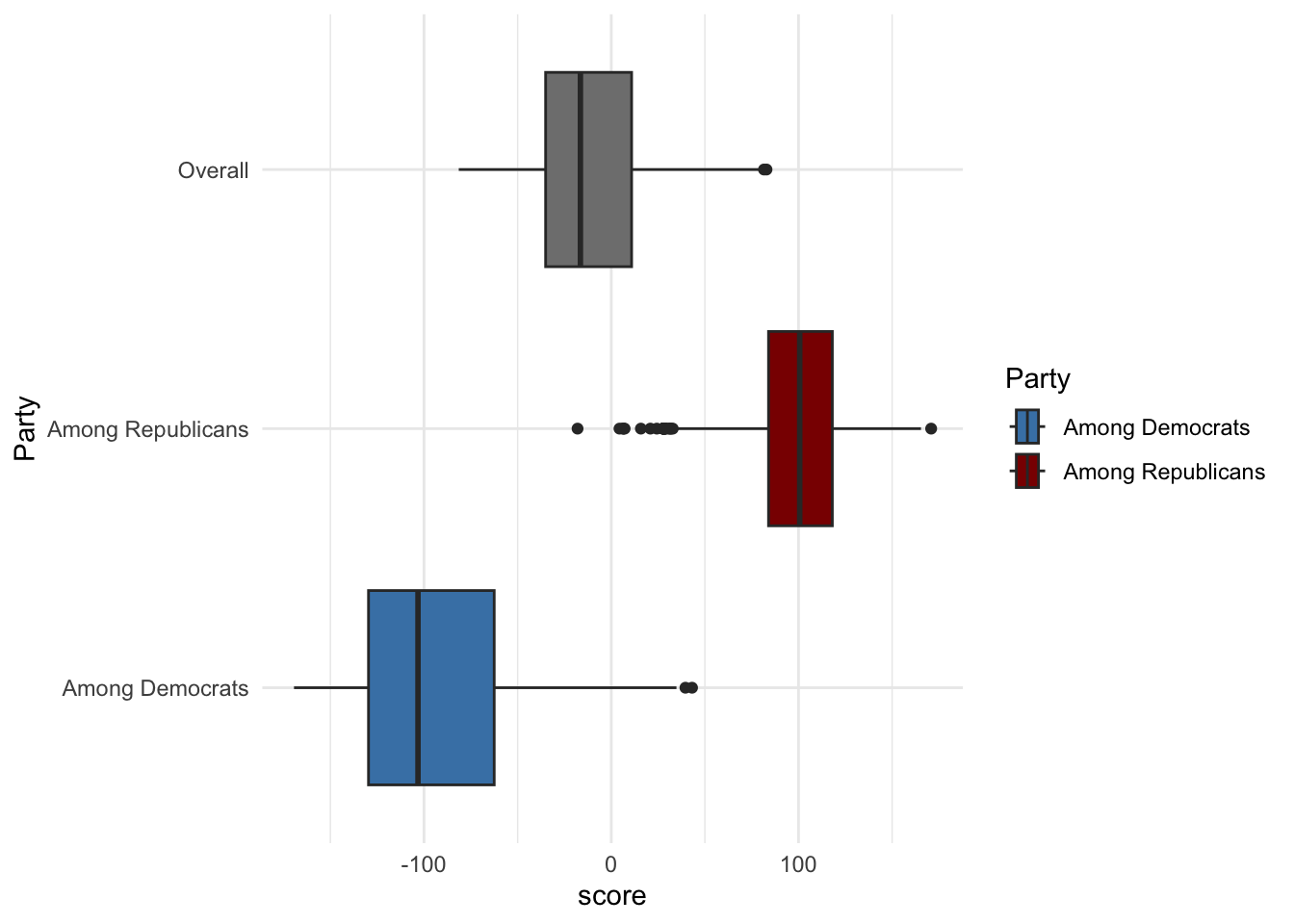
long_data %>%
 mutate(Party = case_when(
    party == "score_dems" ~ "Among Democrats",
    party == "score_reps" ~ "Among Republicans",
    TRUE ~ "Overall") ) %>%
  ggplot(aes(y = Party, x = score, fill = Party)) +
  geom_boxplot(show.legend = FALSE) +
scale_fill_manual(values = c("Among Democrats" = "steelblue", "Among Republicans" = "red4", "score"= "Overall")) + theme_minimal() 
You can also add a jitter layer to the boxplot to show individual data points:
long_data %>%
 mutate(Party = case_when(
    party == "score_dems" ~ "Among Democrats",
    party == "score_reps" ~ "Among Republicans",
    TRUE ~ "Overall") ) %>%
  ggplot(aes(y = Party, x = score, fill = Party)) +
 geom_jitter(alpha = .065,height = .2, show.legend = F) + labs(x="Tweet ratings",y="") +
  geom_boxplot(show.legend = FALSE) +
scale_fill_manual(values = c("Among Democrats" = "steelblue", "Among Republicans" = "red4", "score"= "Overall")) + theme_minimal() 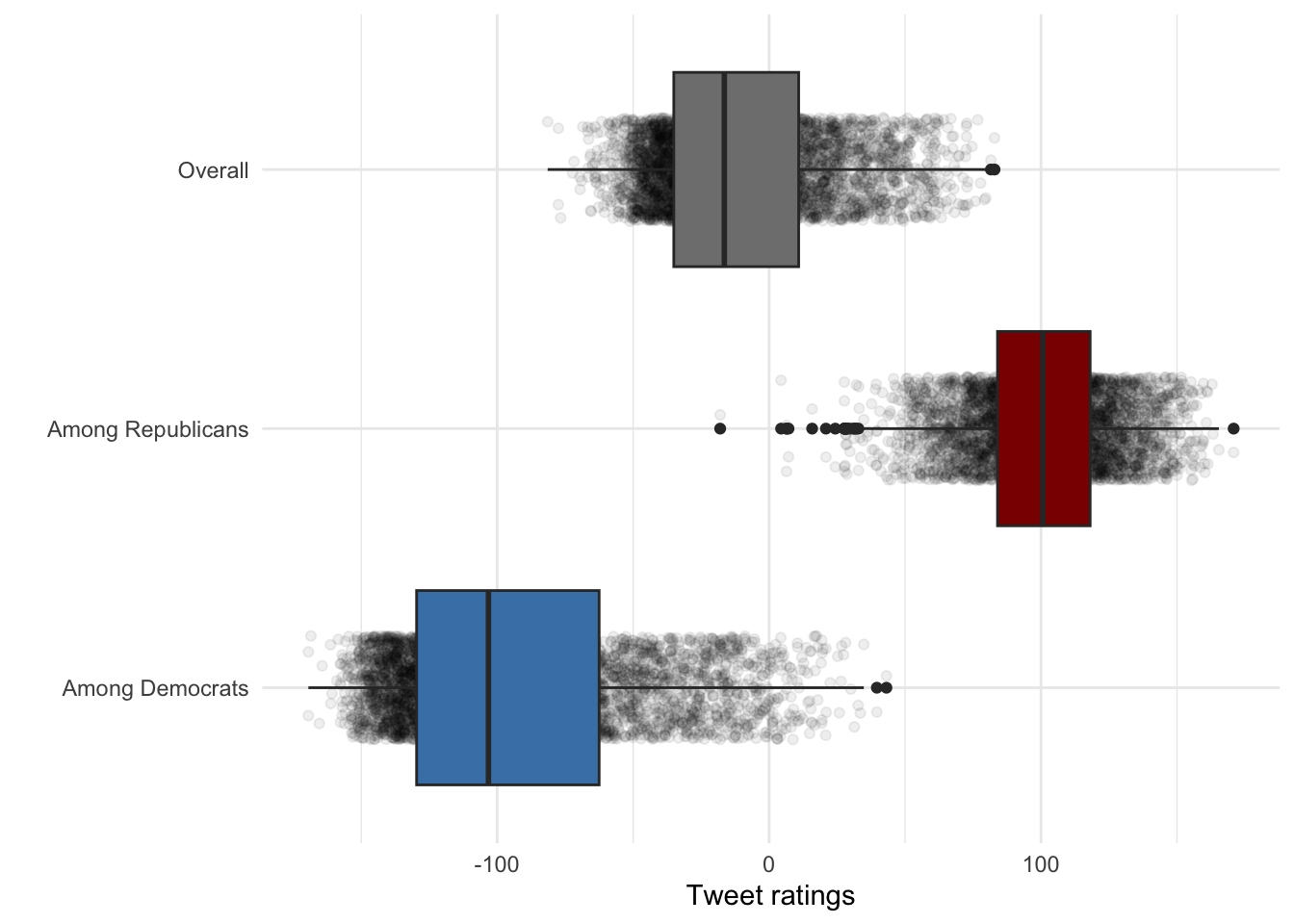
Adjust the boxplot transparency:
long_data %>%
 mutate(Party = case_when(
    party == "score_dems" ~ "Among Democrats",
    party == "score_reps" ~ "Among Republicans",
    TRUE ~ "Overall") ) %>%
  ggplot(aes(y = Party, x = score, fill = Party)) +
 geom_jitter(alpha = .065,height = .2, show.legend = F) + labs(x="Tweet ratings",y="") +
  geom_boxplot(show.legend = FALSE,alpha=.6) +
scale_fill_manual(values = c("Among Democrats" = "steelblue", "Among Republicans" = "red4", "score"= "Overall")) + theme_minimal() 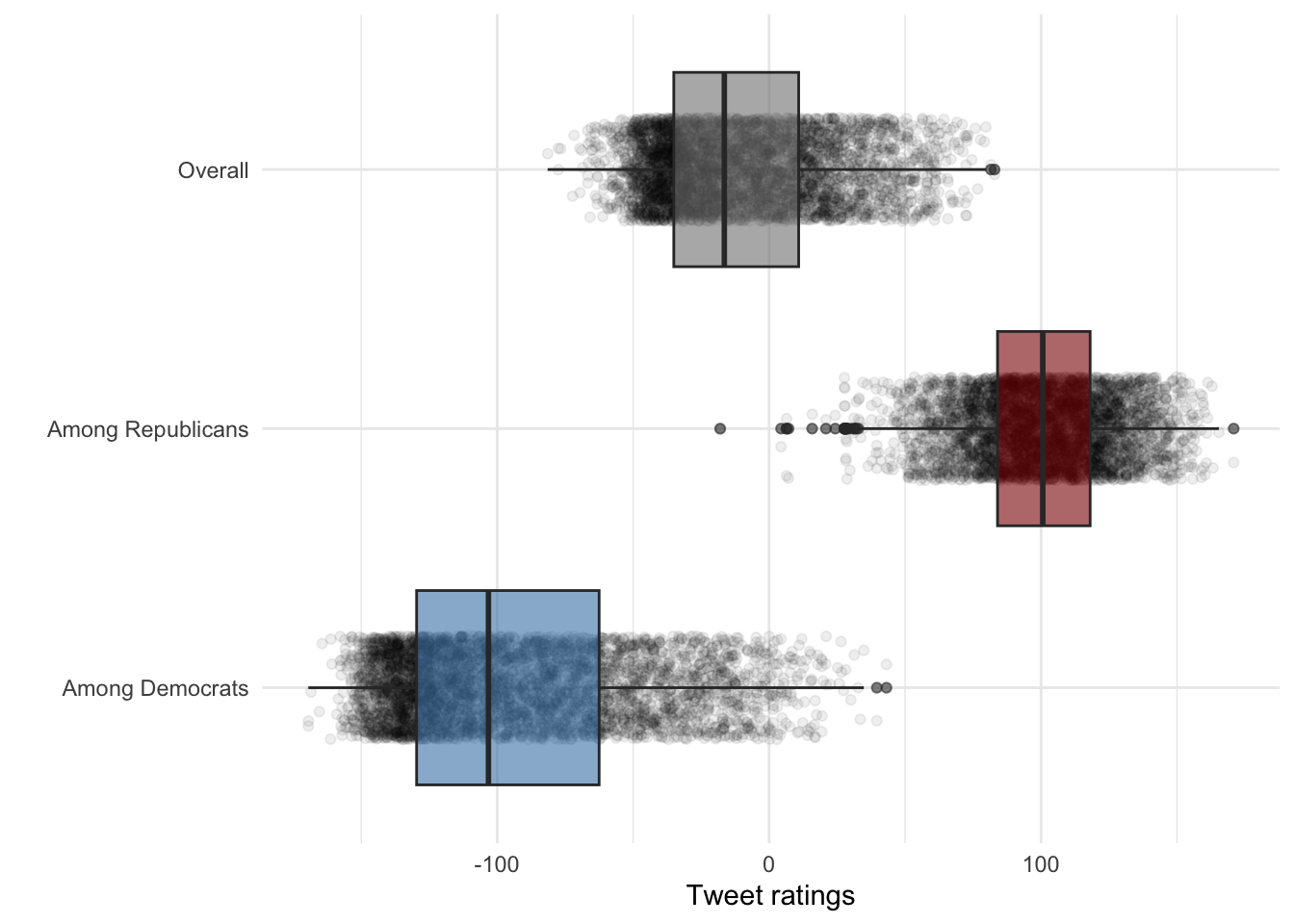
Make the points more subtle
long_data %>%
 mutate(Party = case_when(
    party == "score_dems" ~ "Among Democrats",
    party == "score_reps" ~ "Among Republicans",
    TRUE ~ "Overall") ) %>%
  ggplot(aes(y = Party, x = score, fill = Party)) +
 geom_jitter(alpha = .045,height = .1, size=.25,show.legend = F) + labs(x="Tweet ratings",y="") +
  geom_boxplot(show.legend = FALSE,alpha=.6) +
scale_fill_manual(values = c("Among Democrats" = "steelblue", "Among Republicans" = "red4", "score"= "Overall")) + theme_minimal() 
Make the boxes narrower and the border thinner:
long_data %>%
 mutate(Party = case_when(
    party == "score_dems" ~ "Among Democrats",
    party == "score_reps" ~ "Among Republicans",
    TRUE ~ "Overall") ) %>%
  ggplot(aes(y = Party, x = score, fill = Party)) +
 geom_jitter(alpha = .045,height = .1, size=.25,show.legend = F) + labs(x="Tweet ratings",y="") +
  geom_boxplot(alpha=.75,size=.2,width=.3,show.legend = FALSE,) +
scale_fill_manual(values = c("Among Democrats" = "steelblue", "Among Republicans" = "red4", "score"= "Overall")) + theme_minimal() 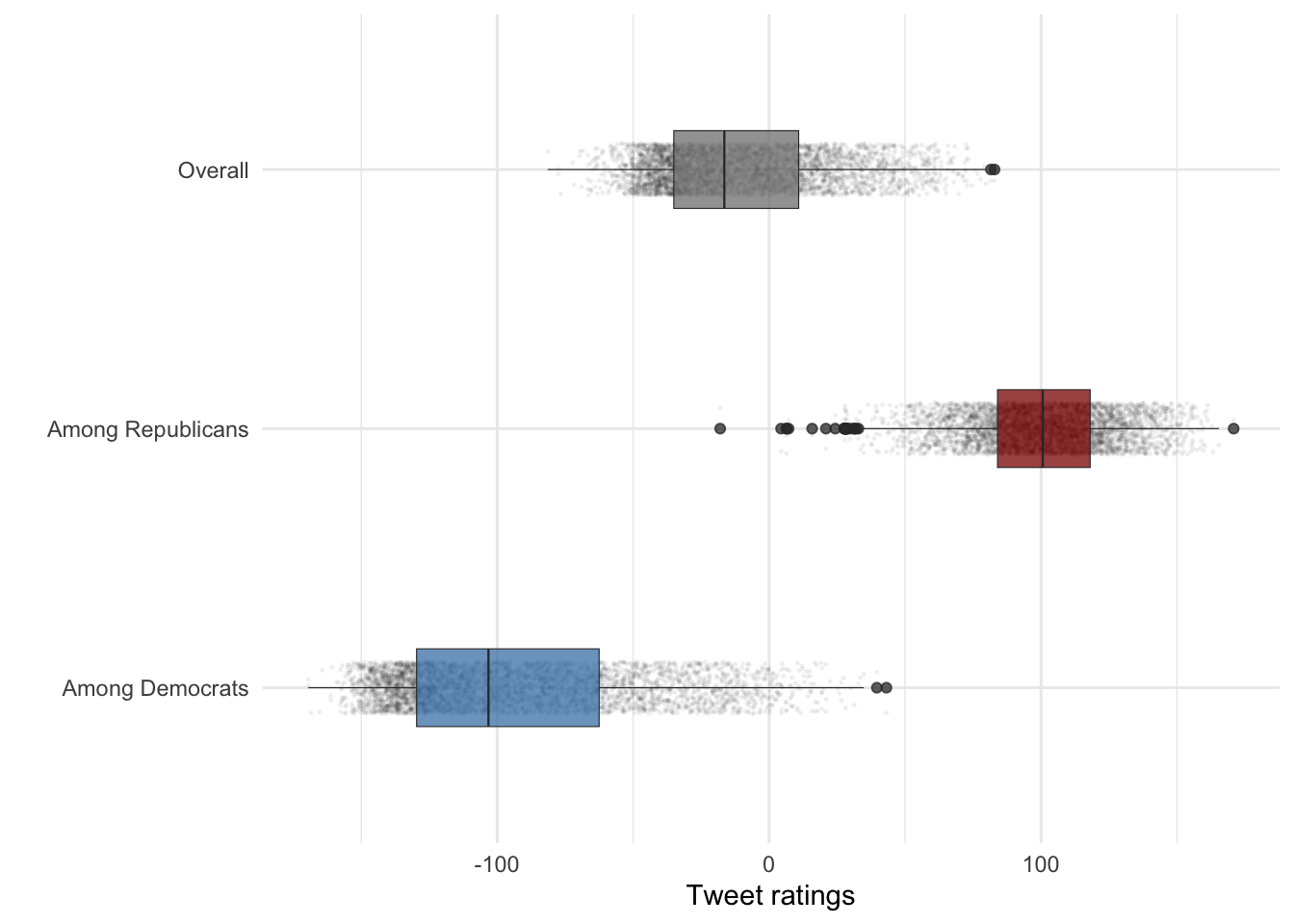
Adjust the dot colors as well:
long_data %>%
 mutate(Party = case_when(
    party == "score_dems" ~ "Among Democrats",
    party == "score_reps" ~ "Among Republicans",
    TRUE ~ "Overall") ) %>%
  ggplot(aes(y = Party, x = score, fill = Party, color = Party)) +
 geom_jitter(alpha = .045,height = .1, size=.25,show.legend = F) + labs(x="Tweet ratings",y="") +
  geom_boxplot(alpha=.75,size=.2,width=.3,show.legend = FALSE,) +
scale_color_manual(values = c("Among Democrats" = "steelblue", "Among Republicans" = "red4", "score"= "Overall")) + scale_fill_manual(values = c("Among Democrats" = "steelblue", "Among Republicans" = "red4", "score"= "Overall")) + theme_minimal() 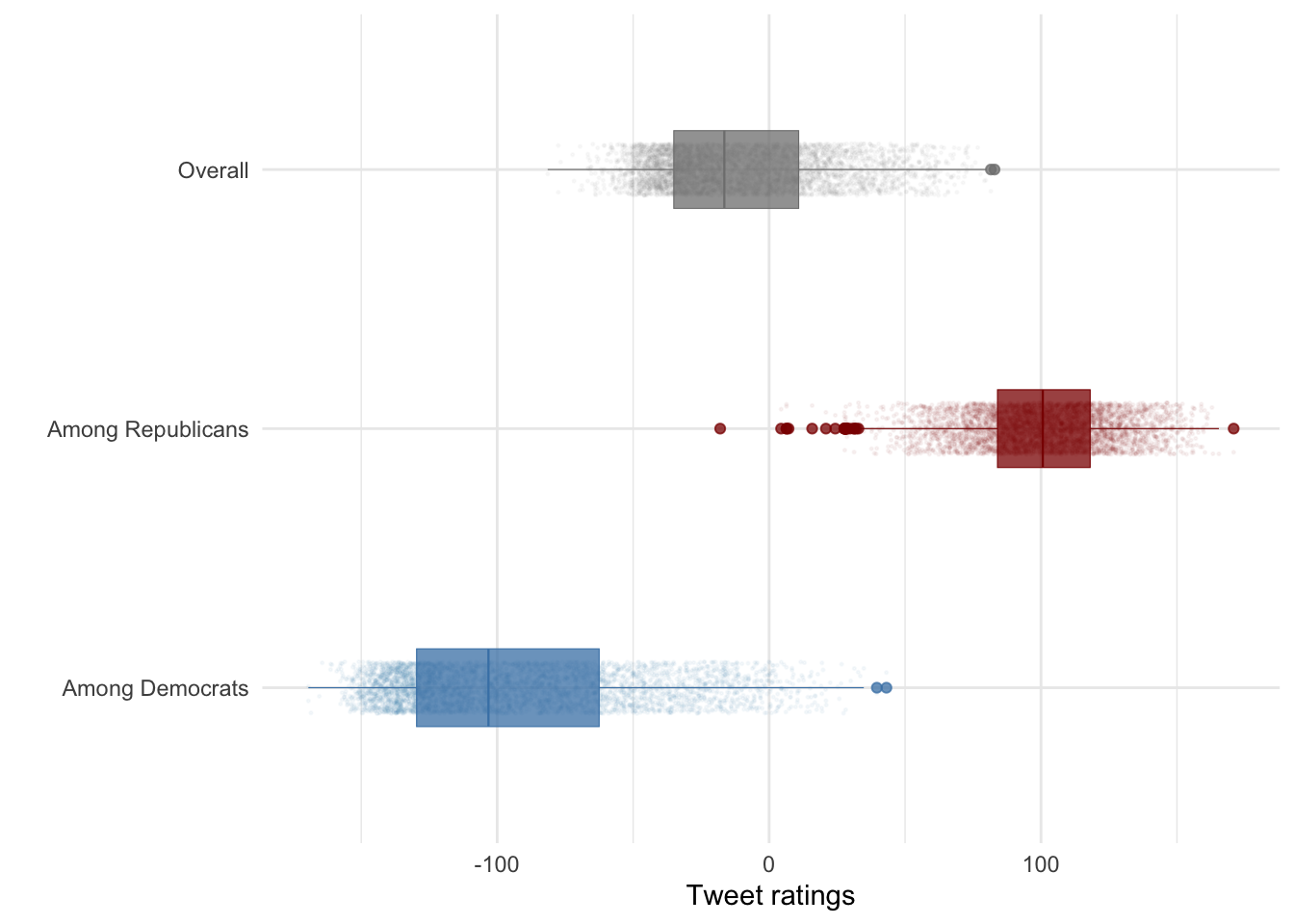
Make final adjustments:
long_data %>%
 mutate(Party = case_when(
    party == "score_dems" ~ "Among Democrats",party == "score_reps" ~ "Among Republicans",TRUE ~ "Overall"), Party = factor(Party,levels = c("Among Republicans","Overall","Among Democrats"))) %>%
  ggplot(aes(y = Party, x = score, fill = Party, color = Party)) +
 geom_jitter(alpha = .045,height = .1, size=.25,show.legend = F) + labs(x="Tweet ratings",y="") +
  geom_boxplot(outliers=F,alpha=.75,size=.2,width=.3,show.legend = FALSE,) +
 scale_color_manual(values = c("Among Democrats" = "steelblue", "Among Republicans" = "red4", "score"= "Overall")) + scale_fill_manual(values = c("Among Democrats" = "steelblue", "Among Republicans" = "red4", "score"= "Overall")) + theme_minimal() + ggtitle("Ratings of Trump tweets among YouGov respondents")
long_data %>%
  ggplot(aes(x = score, color = party)) +
  geom_density() +
  theme_bw() + labs(title = "Density of Scores by Rating Type", x = "Score", y = "Density")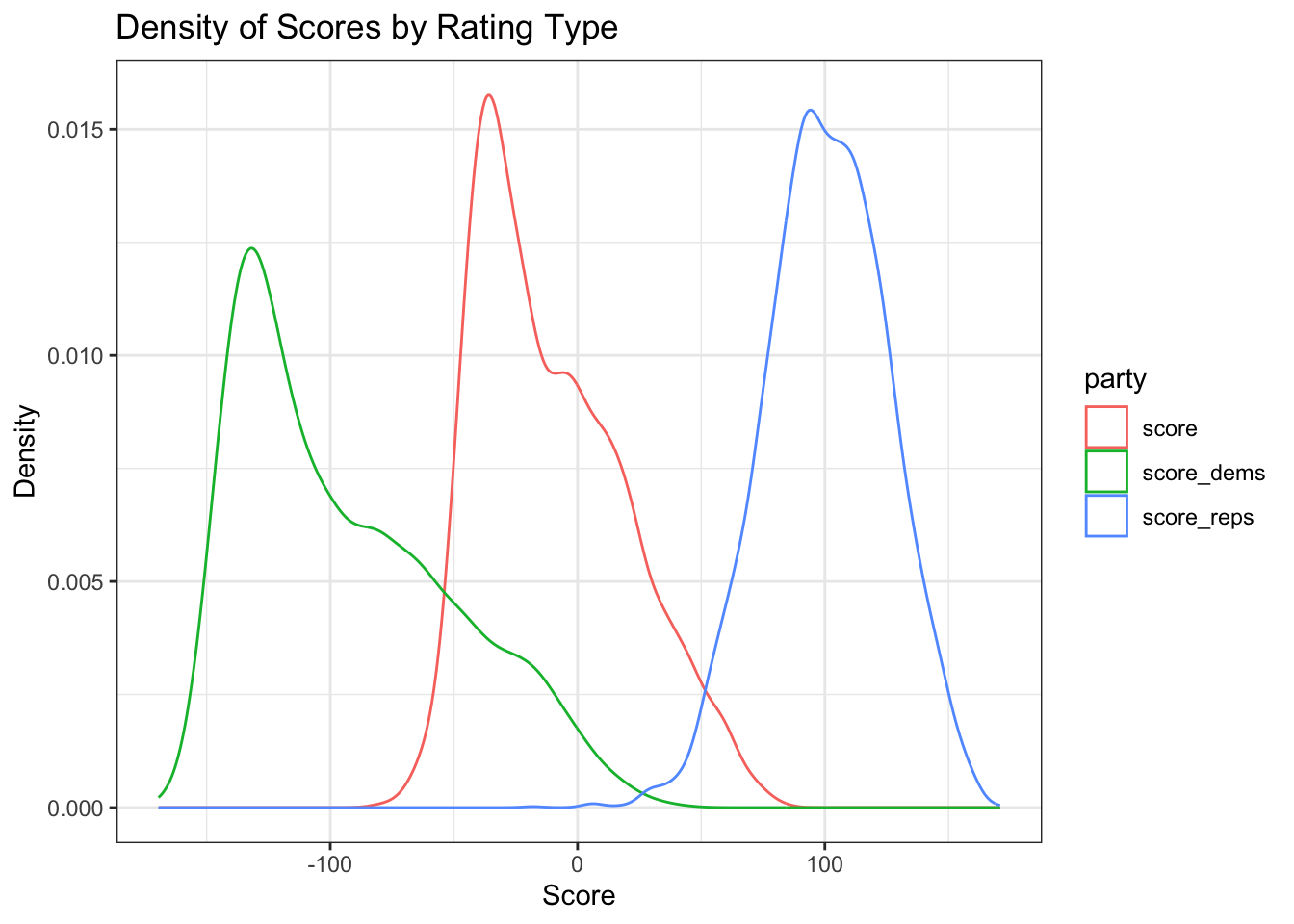
long_data %>%
  ggplot(aes(x = score, fill = party)) +
  geom_density(alpha = 0.6, show.legend = TRUE) +
  scale_fill_manual(
    values = c("score_dems" = "steelblue", "score_reps" = "red4", "score" = "grey")
  ) +
  theme_bw(base_size = 12) +
  labs(title = "Overlayed Density of Scores", x = "Score", y = "Density", fill = "Rating Type")
long_data %>%
  ggplot(aes(x = score, fill = party)) +
  geom_histogram(alpha = 0.5, color = "black", bins = 30) +
  scale_fill_brewer(palette = "Set1", direction = -1) +
  theme_bw() +
  labs(title = "Histogram of Scores by by Party ID", x = "Score", y = "Count", fill = "Rating Type")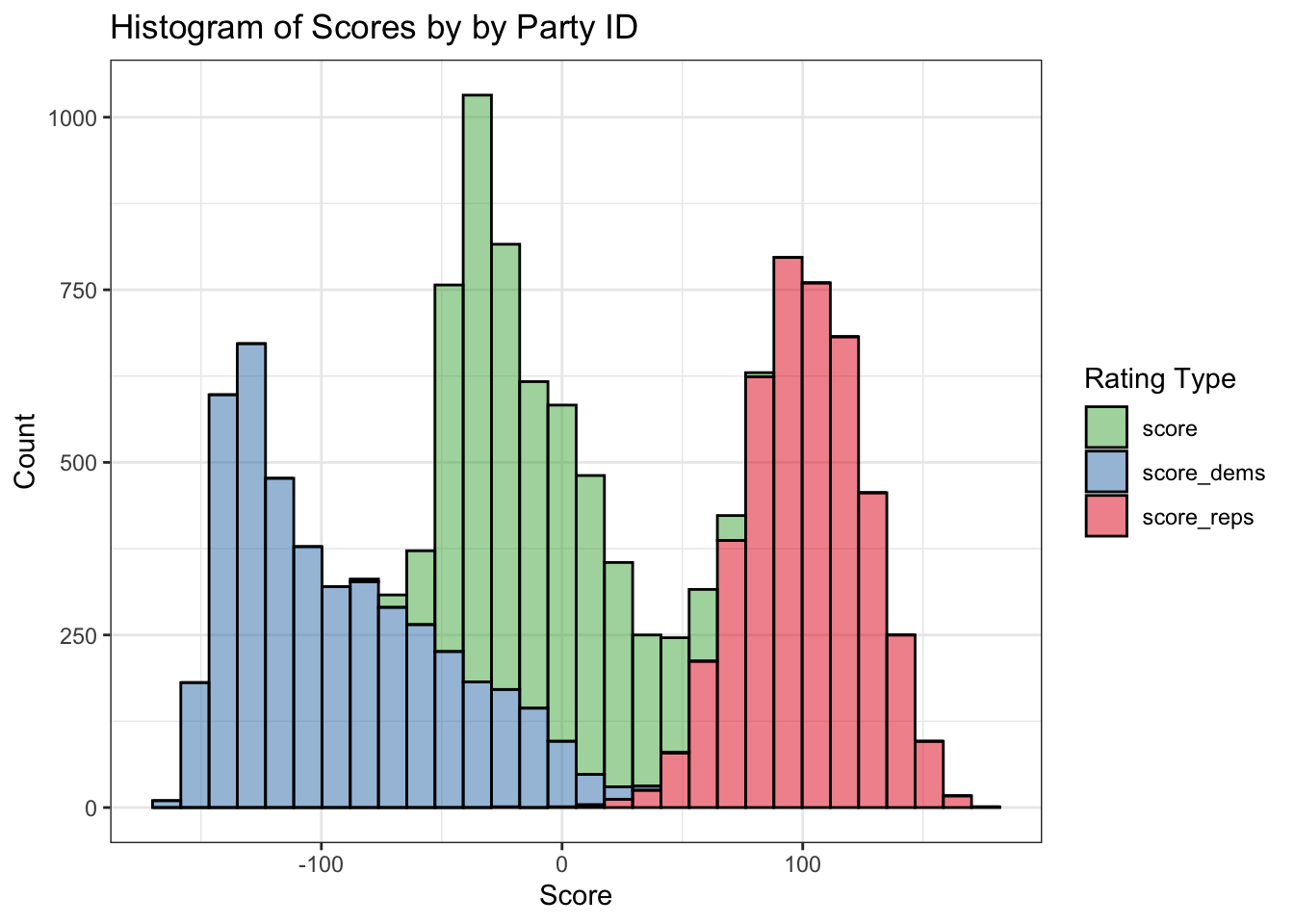
We create a binary indicator obama which is 1 if the tweet text contains the word “Obama”, otherwise 0. Then we can compute how often tweets mention Obama.
# Create indicator for "Obama"
data$obama <- ifelse(str_detect(data$text, "Obama"), 1, 0)

# Frequency of Obama mentions
table(data$obama)
   0    1
4216 188 # Percentage of tweets that mention Obama
prop_obama <- data$obama %>% mean()
prop_obama[1] 0.04268847Compute mean sentiment ratings by Democrats and Republicans for tweets that mention Obama:
data %>%
  filter(obama == 1) %>%
  summarize(
    mean_dems = mean(score_dems, na.rm = TRUE),
    mean_reps = mean(score_reps, na.rm = TRUE)
  )
# A tibble: 1 x 2
mean_dems mean_reps
<dbl> <dbl>
1 -127. 90.8Next, compare average ratings between tweets that do and do not mention Obama:
data %>%
  group_by(obama) %>%
  summarize(
    mean_dems = mean(score_dems, na.rm = TRUE),
    mean_reps = mean(score_reps, na.rm = TRUE)
  )
# A tibble: 2 x 3
obama mean_dems mean_reps
<dbl> <dbl> <dbl>
1 0 -91.6 101.
2 1 -127. 90.8Make a nicer table with descriptive labels and rounded values:
tab <- data %>%
  group_by(obama) %>%
  summarize(
    mean_dems = mean(score_dems, na.rm = TRUE),
    mean_reps = mean(score_reps, na.rm = TRUE)
  ) %>%
  mutate(obama = ifelse(obama == 1, "Obama Mentioned", "Obama Not Mentioned")) %>%
  rename(
    "Tweet type" = obama,
    "Avg. rating among Democrats" = mean_dems,
    "Avg. rating among Republicans" = mean_reps
  )

# Display the table
(tab %>% knitr::kable(digits = 1))| Tweet type | Avg. rating among Democrats | Avg. rating among Republicans |
|---|---|---|
| Obama Not Mentioned | -91.6 | 100.9 |
| Obama Mentioned | -127.4 | 90.8 |
Identify tweets that mention Obama in the scatter of party ratings:
data %>%
  ggplot(aes(x = score_reps, y = score_dems)) +
  geom_point(aes(color = factor(obama)), size = 0.4) +
  scale_color_manual(values = c("0" = "grey60", "1" = "orange")) +
  theme_bw(base_size = 12) + labs(title = "Party Ratings with Obama-Mention Tweets Highlighted",x = "Republican Rating",y = "Democrat Rating",color = "Obama Mentioned")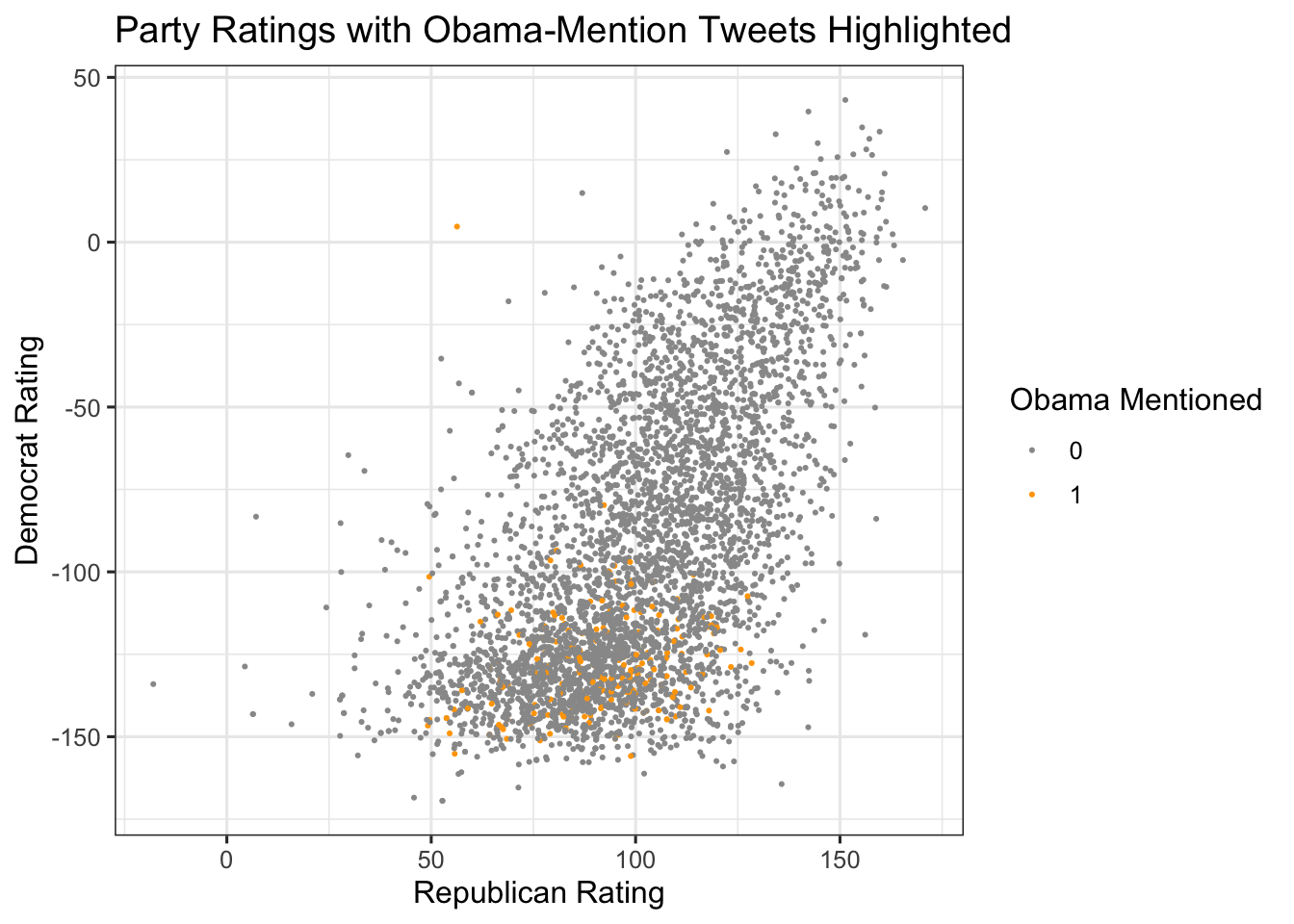
If desired, use gghighlight to emphasize only the Obama-mentioning tweets:
library(gghighlight)
data %>%
  ggplot(aes(x = score_reps, y = score_dems)) +
  geom_point(aes(color = obama), size = 0.4,show.legend=F) +
  gghighlight(obama == 1) + theme_bw(base_size = 12) + labs(subtitle = "Highlighted tweets mention Barack Obama", color = "Obama Mention")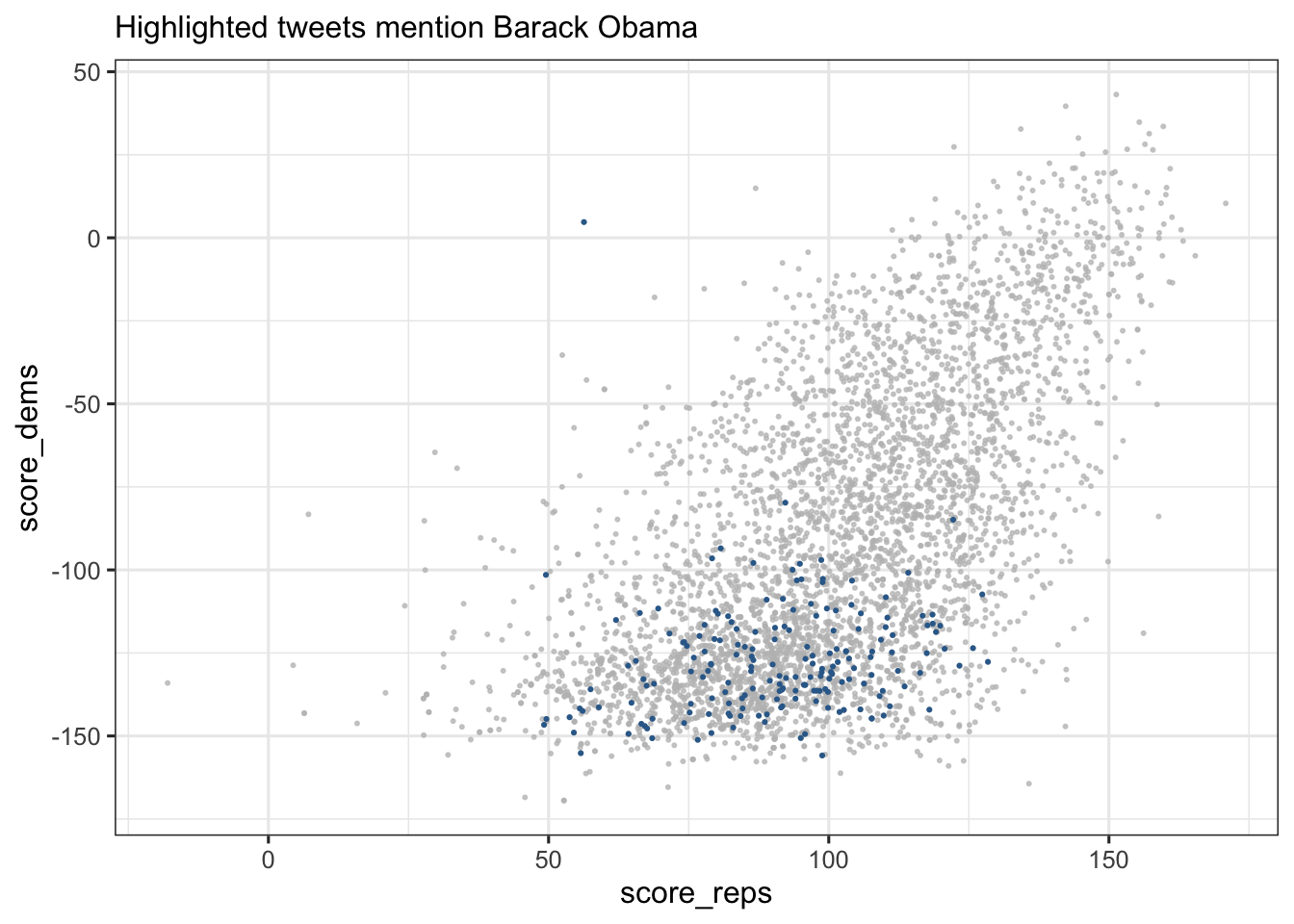
data[19:22, ] %>%
  ggplot(aes(y = text)) +
  geom_point(aes(x = score_dems), color = "blue3") +
  geom_point(aes(x = score_reps), color = "red3") +
  scale_y_discrete(labels = scales::label_wrap(50)) +
  labs(x = "Rating", title = "Ratings of Selected Tweets")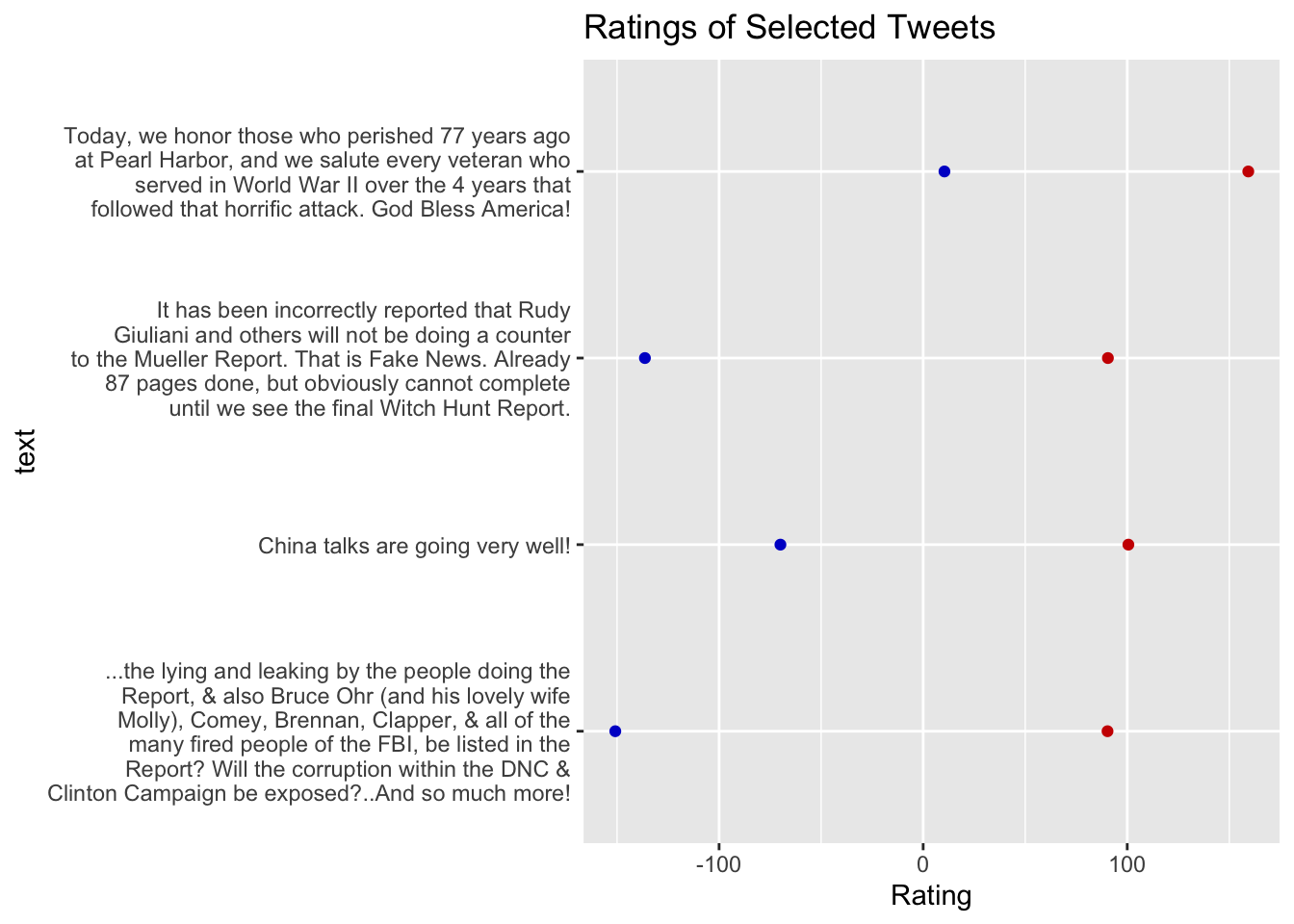
data[60:63, ] %>%
  ggplot(aes(y = text)) +
  geom_col(aes(x = score_dems), fill = "blue3",width=.5) +
  geom_col(aes(x = score_reps), fill = "red3",width=.5) +
  scale_y_discrete(labels = scales::label_wrap(50)) +
  labs(x = "Rating", title = "Ratings of Selected Tweets",y="")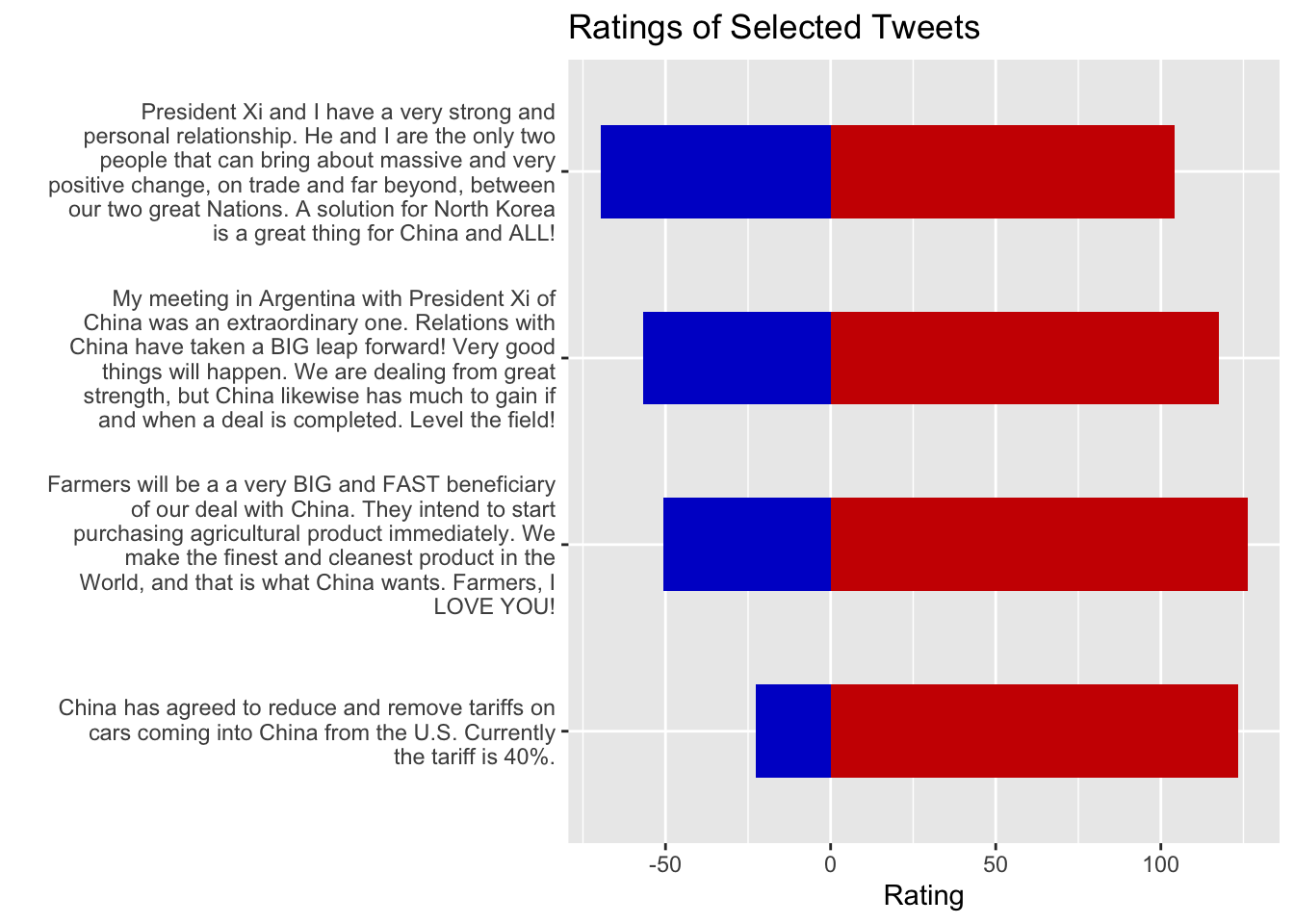
Let’s see if there are tweets mentioning Obama with POSITIVE Democrat ratings
# Extract tweets mentioning Obama with positive Democrat ratings
data %>%
  filter(obama == 1, score_dems >= 0) %>% nrow()
[1] 1So, there was one such tweet! What did it say?
# Extract tweets mentioning Obama with positive Democrat ratings
data %>%
  filter(obama == 1, score_dems >= 0) %>% pull(text)
[1] "I agree with President Obama 100%! https://t.co/PI3aW1Zh5Q"Students should now be able to:
Feel free to modify the code and experiment with different subsets or additional variable transformations.